The 7 Signs Your Meta Conversion Tracking Is Leaking (and What Each One Costs)

If your cost per lead looks fine, this is going to be a slightly annoying read. Sorry in advance.
Your dashboard isn’t lying to you on purpose. It’s reporting what it can see. The trouble is that since iOS 14.5, Safari’s tracking prevention, and ad blockers, what it can see is a fraction of what actually happened. Meta fills the rest in with estimates, so the number still looks clean and you keep scaling.
None of that is your fault. It broke for everybody at the same time. But it still costs you, and in lead generation it costs you in a way that’s almost invisible: your cost per lead holds steady while your cost per funded customer quietly climbs.
These are the seven things I check first when I open an account. I’ll tell you what each one costs and what I’d do about it.
1. Your pixel and CAPI aren’t deduplicated
Your conversions reach Meta two ways: the pixel in the browser, and the Conversions API from your server. Both should be running. The catch is that they have to agree with each other.
They agree through a shared event_id. Get it right and Meta sees the two reports, recognizes them as the same conversion, and counts it once. Get it wrong and you either count everything twice, or the server event never lands and you’re quietly back to browser-only without knowing it.
This is the first thing I check on any account, and not because it’s interesting. It’s because everything downstream depends on it. If your conversion count is wrong, every decision you make after that is built on a wrong number.
What it costs you
Duplicate leads make campaigns look more efficient than they are. You scale on numbers that were never real, then wonder why the CRM never catches up.
What I’d do: Generate one event_id per conversion and send it on both the pixel and the CAPI event. Make sure the event names match exactly, because Meta treats Lead and lead as two different events. Then open Events Manager and look at your deduplication rate. If it’s low, one side is missing the ID.
2. Your attribution window doesn’t match how people actually decide
Attribution windows decide how long after a click Meta still takes credit. The default is 7-day click, 1-day view.
The mistake I see most is a short window on a slow decision. Nobody shops a HELOC or a life policy in an afternoon. They think about it for a week, talk to a spouse, come back. Report on 1-day click and you never see those conversions. Worse, Meta starts optimizing to find only the people who move fast, so you’ve quietly shrunk your own audience.
One more thing worth knowing, because it caught a lot of people off guard. In March 2026 Meta narrowed click-through attribution to link clicks only, and moved likes, shares, saves, and comments into a separate “engage-through” window (Meta’s announcement). If your numbers moved this spring and you changed nothing, that’s probably why. The upside: your Meta numbers should line up more closely with Google Analytics now.
What it costs you
You undervalue campaigns that are working, cut their budget, and starve the exact consideration audience that would have converted next week.
What I’d do: Pick the window that matches how your buyers actually decide, then leave it alone. Consistency matters more than the specific number, because the moment you change it mid-flight you can’t compare anything to anything.
3. Your events are firing on the wrong page
A Lead event should fire once, on the thank-you page, after the form actually submits.
You’d be surprised how often it doesn’t. I find it firing on button click, so it counts people who never finished. Or on every page load, so it counts everybody. Or duplicated across the site header and the form page, so one person becomes three.
You can check your own in about a minute. In Events Manager, open the event and switch the breakdown from “Data Source” to “URLs.” It shows every page the event fired on. If your homepage is generating Lead events, there’s your answer.
While you’re in there, glance at your parameters. A dollar sign, or a lowercase usd instead of USD, quietly breaks value-based optimization and nothing warns you.
What it costs you
Events on the wrong page invent conversions that never happened. Meta then goes and finds more people like the ones who triggered them, which is to say, people who don’t convert.
What I’d do: Keep only PageView in the site header. Fire Lead on the real confirmation step, verify it in Test Events, then check that URL breakdown to confirm it’s firing where you think it is.
4. You can’t match Meta’s leads to your CRM
This is the one I care about most, and it’s the hardest to see.
Meta reports a marketing signal: how many form fills it believes it drove, including modeled estimates for people who opted out of tracking. Your CRM reports a business outcome: actual, deduplicated humans who became a funded loan or a bound policy. Those are two different questions. They were never going to produce the same number.
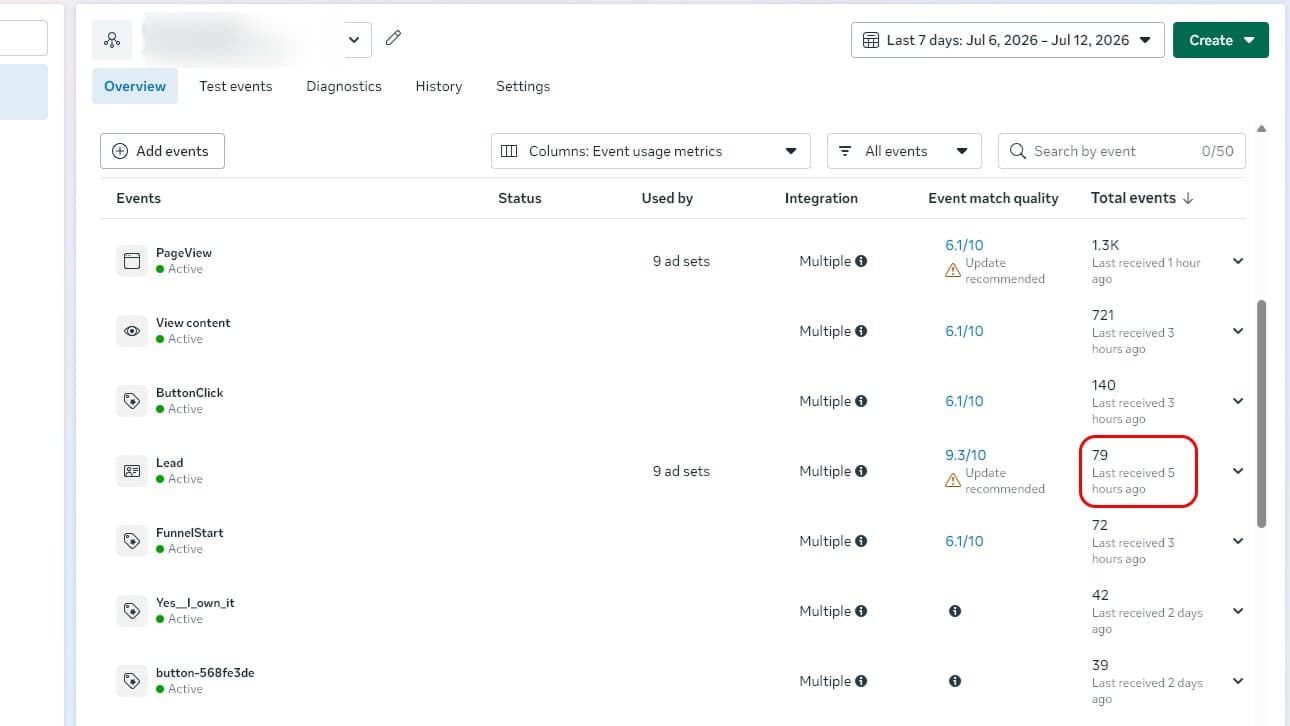
The gap itself isn’t the problem. The gap is normal. The problem is not being able to explain it. If you can’t trace a Meta click to a lead ID, to a CRM status, to money actually collected, then you’re guessing about which campaigns make you money. And guessing gets expensive at scale.
What it costs you
When Meta’s number runs well ahead of your CRM’s, you scale a campaign that looks profitable and isn’t, and you cut the one that was quietly working.
What I’d do: Send your real outcomes back to Meta as offline conversions so it optimizes toward funded customers instead of form fills. Keep Meta’s attributed number for what it is, but reconcile it against what your CRM actually confirms.
5. Your best-spending ads show almost no real conversions
When an ad is spending well and producing almost nothing, it’s usually not the creative.
Three things I look at first. Is the objective actually aligned with the outcome? If it’s set to Traffic, Meta is doing exactly what you asked and finding people who click. Is it optimizing for the cheapest possible lead? Then it’ll happily find you people who fill out forms and never qualify. And is the conversion event even firing on the real submission, or is it firing on page load and missing the thing that matters?
There’s a volume problem hiding in here too. Meta needs roughly 50 conversions per week per ad set to get out of the learning phase. Five ad sets at $10 a day is a very different animal from one at $50, and most accounts I see are split into too many ad sets to ever learn anything.
What it costs you
You pay for clicks and cheap leads that look great on a cost-per-lead report and never turn into customers.
What I’d do: Match the objective to the outcome, confirm the event fires on real submissions, and consolidate ad sets so each one gets enough data to actually learn.
6. Your Event Match Quality is under 6
Event Match Quality is Meta’s 0-to-10 score for how confidently it can tie your conversions to real people, based on the customer information you send with each event.
Under 6 means it’s struggling. Your retargeting pools shrink, your lookalikes get built from a fuzzy seed, and your costs drift up, all without anything obviously breaking. That’s what makes it easy to miss.
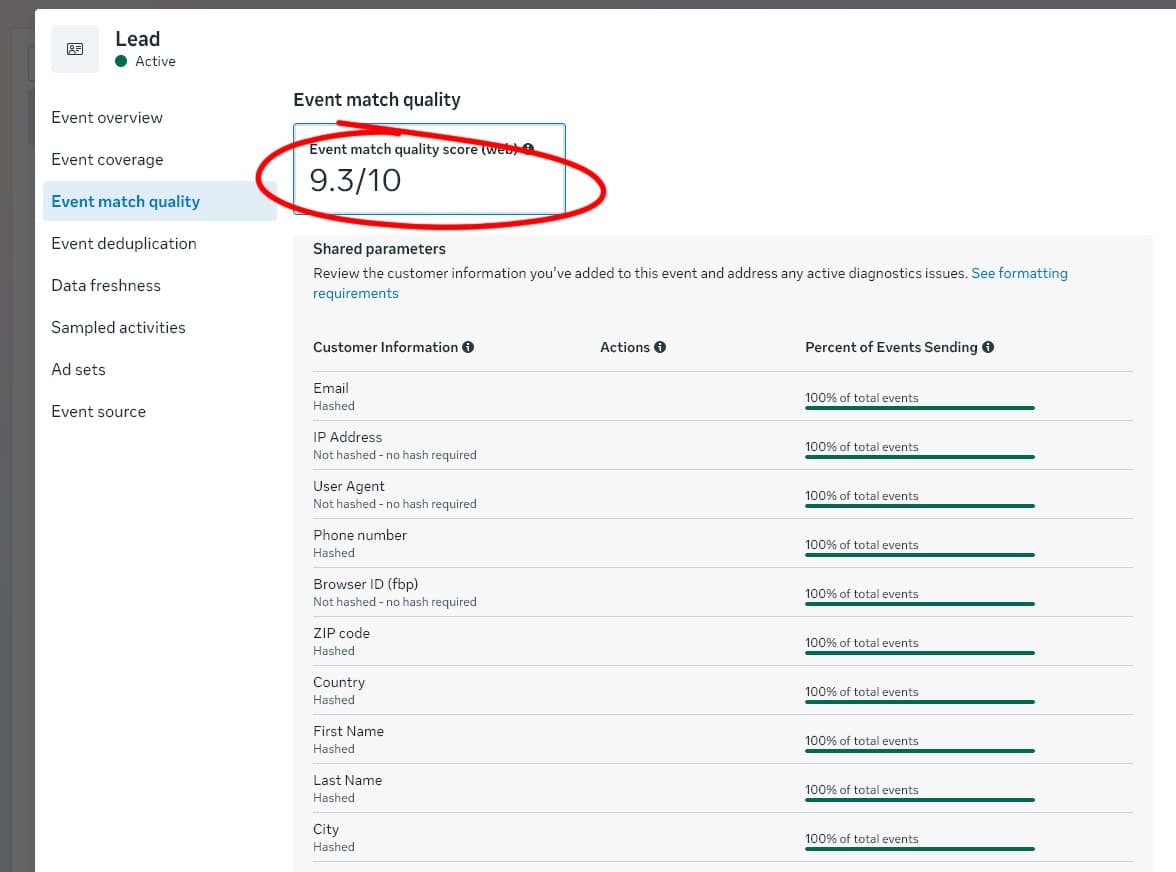
Here’s the frustrating part, and the good news. In lead gen you already have the data. The person just typed their email and phone number into your form. If you’re only sending an IP address, you’re leaving a match on the table that you already collected.
What it costs you
Poor matching shrinks your audiences, weakens your lookalikes, and pushes your cost per acquisition up while your dashboard looks unremarkable.
What I’d do: Send multiple hashed identifiers server-side: email, phone, name, along with the fbp and fbc cookies. Normalize and hash them properly, and reuse them on that person’s later events. Most accounts I touch jump several points from this alone.
7. Nobody chose your attribution model
Most advertisers never consciously picked one. They inherited the default and have been reading it ever since.
That’s worth fixing, because platform attribution has a built-in bias. Meta is grading its own homework. It sees Meta touchpoints and is blind to your organic, your email, your direct traffic. It tends to overstate retargeting, because the people you retarget were mostly going to buy anyway. Follow that number too literally and you’ll keep shifting budget toward capturing demand you already had, and away from the top of the funnel that creates it.
What it costs you
You over-invest in retargeting and under-invest in the thing that actually grows the business, all from reading a number nobody chose on purpose.
What I’d do: Decide deliberately what counts as a conversion for your business. Compare Meta’s attributed results against incremental impact, and anchor budget decisions to what your CRM confirms.
Where to start
Don’t try to fix all seven at once. Start with deduplication and event placement, because they corrupt everything downstream. Then work through attribution, matching, and the CRM reconciliation that tells you what’s actually real.
None of this is exotic. It’s just unglamorous, which is exactly why it’s the part most people skip.
If you want to know which of these are true for your account without touching a line of code, that’s what the free score is for. Three minutes, no account access.
Common questions
Is the Meta pixel still enough on its own?+
No. Since iOS 14.5 and browser tracking restrictions, a browser-only pixel typically loses 20 to 40 percent of conversions to iOS, Safari, and ad blockers. The Conversions API (server-side) is what recovers them, and the two must be deduplicated so each conversion counts once.
Does this apply to lead generation, not just ecommerce?+
Yes, and it matters more. In lead gen your real outcome is a funded loan, a bound policy, or a booked appointment, not a checkout. If only the form fill makes it back to Meta and the downstream outcome never does, Meta optimizes for cheap leads instead of real customers.
How do I check my Event Match Quality?+
In Meta Events Manager, open your dataset, select an event, and view its Event Match Quality score (0 to 10), calculated from the last 48 hours. Below 6 usually means you are not sending enough matched customer information, like hashed email and phone, especially server-side.
What does a leaking setup actually cost?+
It is rarely a line item you can see. It shows up as a cost per lead that looks fine while your cost per funded customer quietly climbs, because Meta is optimizing on partial or inflated signal. The fix usually pays for itself in recovered signal alone.
Find out which of these are true for your account.
Get your Tracking 100 score in about three minutes. No account access.